Description
iLovePDF is a powerful and all-in-one PDF management tool designed for users who regularly work with digital documents. Whether you are a student, teacher, freelancer, or business professional, iLovePDF provides everything needed to handle PDF files efficiently from one platform. It combines a PDF reader, editor, converter, compressor, and organizer into a single lightweight solution that works seamlessly across devices.
Unlike many traditional PDF tools that focus on limited functionality, iLovePDF offers a comprehensive toolkit that saves time and improves productivity. From simple viewing to advanced editing and conversion tasks, the software ensures smooth performance without overwhelming system resources.
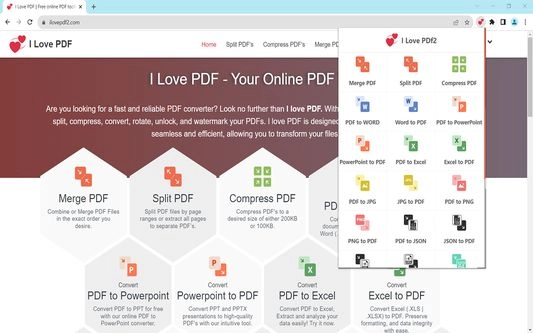
All-in-One PDF Tools in One Dashboard
iLovePDF stands out because of its centralized and user-friendly dashboard. All tools are accessible in just a few clicks, making it easy even for beginners to manage documents without technical knowledge.
Users can:
- Merge multiple PDF files into one
- Split large PDFs into smaller sections
- Compress PDFs to reduce file size
- Convert PDFs to Word, Excel, PowerPoint, and images
- Convert images (JPG, PNG, TIFF) into PDF format
- Rotate, unlock, and organize pages
The drag-and-drop interface allows bulk file processing, which is especially helpful for professionals dealing with large volumes of documents daily.
PDF Editing, Conversion, and Compression Made Simple
iLovePDF makes editing PDF files straightforward. Users can add text, insert images, include page numbers, and apply watermarks to protect documents. Digital signatures and business branding features make it suitable for corporate use.
The conversion tool supports multiple formats, ensuring smooth transitions between PDFs and editable documents. Whether you need to convert a PDF into Word for editing or turn a presentation into a PDF for sharing, iLovePDF handles the task quickly and accurately.
Compression is another key strength. Large PDF files can be reduced in size within seconds without noticeably affecting quality. This is useful for email sharing, cloud storage, and device optimization.
Strong Security and Data Protection of iLovePDF
Security is a major concern when working with documents, and iLovePDF takes it seriously. The platform uses end-to-end encryption to ensure files remain private and protected. Uploaded files are automatically deleted after processing, reducing the risk of data exposure.
For offline users, the desktop version includes built-in protection against malware and unauthorized access. This makes iLovePDF a safe choice for handling sensitive personal, academic, or business documents.
Cloud Integrations and API Support Of iLovePDF
iLovePDF supports seamless integration with popular cloud platforms such as Google Drive and Dropbox. This allows users to import and export files directly from cloud storage, reducing unnecessary downloads and uploads.
For businesses and developers, iLovePDF also provides API access. This enables companies to integrate PDF tools directly into their systems, workflows, or applications, improving automation and operational efficiency.
Business Solution: Designed for Productivity
The business edition of iLovePDF is tailored for teams and organizations that rely heavily on document workflows. It supports batch processing, collaboration, branding tools, and secure document handling.
By promoting digital documentation, iLovePDF helps businesses reduce paper usage and support eco-friendly practices. Teams can work faster, organize files better, and maintain consistent branding across documents.
Education Solution: Ideal for Students and Teachers
iLovePDF also offers a dedicated solution for educational use. Students can organize assignments, notes, and study materials in PDF format for easy offline access. Teachers and institutions can manage academic documents, forms, and resources more efficiently.
The ability to convert different file formats into PDFs helps maintain consistency across departments. This simplifies document sharing, storage, and retrieval for educational workflows.
Cross-Platform Availability Of iLovePDF
iLovePDF is available on Apkfamous.com and :
- Windows (desktop application)
- Web browser (online version)
- Android
- iOS
This cross-platform support ensures users can access their tools anytime, anywhere, across multiple devices. The software is lightweight and runs smoothly even on older systems.
Free vs Premium Version
The free version of iLovePDF offers essential tools such as viewing, basic conversion, and limited editing. However, advanced features like unlimited processing, higher file size limits, and premium tools are available through paid subscriptions.
Users can choose between monthly or annual plans depending on their needs. The premium version is ideal for professionals who require unrestricted access and faster processing.
Pros and Cons of iLovePDF
Pros
- Complete PDF management toolkit
- Easy-to-use interface
- Fast processing and batch support
- Strong encryption and data security
- Cloud and API integrations
- Available on multiple platforms
Cons
- Advanced features require a paid plan
- Free version has limitations on file size and usage
Conclusion
iLovePDF is an excellent choice for anyone looking for a reliable, efficient, and secure PDF solution. It combines essential and advanced tools into a single platform without compromising performance or usability.
Whether you need to edit, convert, compress, or organize PDFs for personal, academic, or professional use, iLovePDF delivers consistent results. Its flexibility, security, and ease of use make it one of the best PDF tools available today.
If you want a complete PDF solution that works across devices and simplifies document workflows, iLovePDF is definitely worth considering.